Introduction to Vue.js

Today’s article will be all about Vue.js, its new conceptions and implementation. Vue (pronounced /vjuː/, like view) is a progressive framework for building user interfaces. Before we get started, we should ask the question of why Vue? There are tons of other front-end frameworks and libraries out there, but Vue newly came out.
Why Vue?
Well, the main difference between Vue and other monolithic frameworks is, Vue is wholly adoptable starting from its creation. Because the core layer is only focused on view layer, Vue is easy to integrate to our projects. That means we are not bothered with long setup stuffs. Moreover, Vue is highly capable of building powerful Single-Page Appliations. The other reasons to choose Vue, will be covered through the article.
Following topics will be covered:
- Vue Syntax
- Virtual DOM
- The Vue instance
- Components
- Props
- Slots
1. Vue Syntax
The template syntax of Vue.js is HTML based which makes allows us to bind the renderer DOM the primary Vue instance data. Because all Vue.js templates are HTML based, they can easily be parsed by spec-compliant browsers and HTML parsers. On the other hand, Vue also uses the conception of Virtual DOM.
Virtual DOM is just simply a JavaScript object which represents the Document Object Model (DOM). Your application will update the Virtual DOM and never actually has to update the DOM directly. Most JavaScript libraries update the DOM by implementing changes on the Virtual Dom.
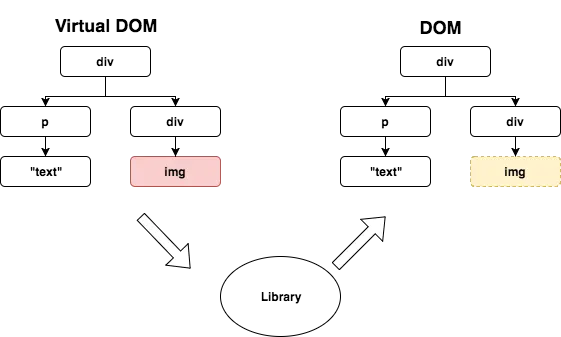
Libraries including Vue.js uses Virtual DOM to track changes and apply them to the DOM
Vue compiles the templates into Virtual DOM render functions. Using reactivity system, Vue is capable of automatically identifying the minimal number of components to be re-rendered and decreasing the DOM manipulations when the app state changes.
- Connecting Vue.js
We can connect Vue.js to our project with CDN link or Vue CLI.
- CDN link :
<script src="https://cdn.jsdelivr.net/npm/vue@2.5.22/dist/vue.js"></script>
- Vue CLI
Vue provides an official CLI for quickly building Single Page Applications. It provides everything-included setup for a modern front-end workflow. To use Vue CLI you should download and install Node.js first. Then, head to Node.js Command Prompt to setup your project.
yourpath>npm i @vue-cli
When you install Vue CLI, you can go further and create project:
yourpath>vue create ProjectName
You can leave everything default and wait for creating the project boilerplate. You can learn more about Vue CLI here.
- Basic Syntax for Vue.js
//Mustache Syntax
//Simplest method to bind myName variable
<div> My name is: {{ myName }} </div>

//Attributes
//Class changes whenever the dynamicClass variable changes
<div v-bind:class="dynamicClass"></div>

//Directives
<p v-if="true">Show me</p>

//Modifiers
<form v-on:submit.prevent="onSubmit"></form>
2. Vue Instance
When we write a Vue appliation we start by creating a new Vue instance. As a convention we refer to the Vue instance as vm:
var vm = new Vue({
 //options
})
Vue’s design pattern was inspired from MVVM, but it is not completely same with it. When we create a Vue intance, we should pass in an object to create our desired behavior. You can see full list of options reference here.
When we create a Vue instance, the properties inside data object are reactive means that when the properties inside the data object changes, it looks for updates and re-render the DOM via ‘reacting’ the changes.
var vm = new Vue({
  data: {
    name: 'Ilkin',
  }
})
3. Components
Components are reusable parts of application. This conception is widely used in Vue.js and other front-end frameworks such as React and Angular. In any application, we don’t want all of our data, methods, computed properties, etc. living on the root instance. Over time, that would become unmanageable. Instead, it is better to break up our code into modular pieces so that it is easier and more flexible to work with. To understand components deeply I suggest you to cover Module conception here.
Creating Component:
//Registering Component
Vue.component('component-name', {
  template: '<div>This is a component view</div>',
  data(){ return {//data here} },
  methods: { //methods here },
  computed: { //computed properties here }
})
Now we can use this component as a custom element inside a root Vue instance:
//Vue Instance
new Vue({ el: '#app' })

//Using our component as a custom element
<div id="app">
     <component-name></component-name>
</div>
Components can be reused as many times as you want. That’s because the components are also Vue instances, and each time you use a component, a new instance of it is created. A component’s data option must be a function (not an object as in root instance), so that each instance can maintain an independent copy of the returned data object.
Organizing Components:
A basic structure commonly seen when starting an application from scratch has a components folder with Vue components iside, along with a main.js entry file and an App.vuecomponent:
src/
  main.js
  App.vue
  components/
      Header.vue
      Footer.vue
Beside the individul components we can have component groups such as pages. Thus, we can create a pages folder when we can place our page components:
src/
  main.js
  App.vue
  components/
      Header.vue
      Footer.vue
  pages/
      About.vue
      Home.vue
      Contact.vue
That’s an easy split and already gives us a bit of structure, so that when we know where to place and search for pages components. In all real applications we also have common components like buttons, panels, modals and other UI components. Thus we can create another folder called ui inside of components folder.
src/
  main.js
  App.vue
  components/
      Header.vue
      Footer.vue
      ui/
         Button.vue
         Panel.vue
  pages/
      About.vue
      Home.vue
      Contact.vue
After creating components we can import (ES2015+) any of them anywhere and use directly.
//inside of Home.vue
<template>
  <div>
    <Header></Header>
    //Some content here
    <Footer></Footer>
  </div>
</template>

<script>
import Header from '../components/Header.vue'
import Footer from '../components/Footer.vue'

export default {
  name: 'Home',
  components: {
    Header,
    Footer
  }
}
</script>
4. Props
As we divided our application into components to make them reusable, we also need to pass some data to components from parent component. For this purpose, we use props .
Vue.component('child-component', {
  props: ['someText'],
  template: `<div>{{ someText }}<div>`
});

new Vue({
  el: "#app",
  data() {
    return {
      textToPass: 'Hey! I am passed into child component'
    }
  }
});

<div id="app">
  <child-component :someText="textToPass"></child-component>
</div>
In this example, we have created someText prop that we can pass data from parent component. We have passed Hey! I am passed into child component sentence to the child-component .
We can also add validation to our props, which is similar to PropTypes in React. This is nice because it’s self-documenting, and will return an error if it’s not what we expected, but only in development mode.
Vue.component('child-component', {
  props: {
    text: {
      type: String,
      required: true
    }
  },
  template: `<div>{{ someText }}<div>`
});
We can set prop types as JavaScript datatypes (Number, String, Boolean, null, Array, Object etc.).
5. Slots
What happens when we have two components with slight variations, either content or style deviations? We could pass all the different content and styles down into the component with props, and switch everything out each time, or we could fork the components themselves and create different versions of them. But it would be really nice if we could reuse the components, and populate them with the same data or functionality. This is where slots come in really handy.
To allow a parent component to pass DOM elements into a child component, provide a <slot></slot> element inside the child component. You can then populate the elements in that slot with <child-component><p>MyContent</p></child-component>.
//Child Component
<template>
  <div>
    <p>I'm the child component!</p>
    <!-- Content from the parent gets rendered here. -->
    <slot></slot>
  </div>
</template>

//Parent Component
<template>
  <div>
    <child-component>
      <p>I will be rendered in slot of child component!</p>
      <p>Any data can be binded like this {{someText}}</p>
    </child-component>
  </div>
</template>

<script>
import ChildComponent from './ChildComponent.vue';

export default {
  components: {
    ChildComponent
  },
  data() {
    return {
      someText: `I'll be binded in slot!`
    }
  }
}
</script>
Named Slots
Sometimes we would need to use multiple slots into same component. In this case, we use named slots. Let’s assume we are building base-layout component.
//base layout component
<div class="container">
  <header>
    <slot name="header"></slot>
  </header>
  <main>
    <slot></slot>
  </main>
  <footer>
    <slot name="footer"></slot>
  </footer>
</div>

//any page
<base-layout>
  <template slot="header">
    <h1>Page title or smth. else</h1>
  </template>

  <p>Your main content here</p>

  <template slot="footer">
    <p>Footer related information here</p>
  </template>
</base-layout>
Fallback Content
If the parent does not inject any content into the child’s slot, the child will render any elements inside its <slot></slot> tag, like so:
//child component
<template>
  <div>
    <slot>
      <p>Hello from the child!</p>
    </slot>
  </div>
</template>
Here, if we do not inject any content into slot from parent content, the default rendered content will be <p>Hello from the child!</p> .
This is it for today’s article. I hope it is a good starting to get familiar with one of the awesome front-end framework, Vue. I am planning to continue with Vue.js series to help people understand better the concepts of it.
Known errors
- Props example declares prop
textbut the template renders{{ someText }}. - Two templates use {{ someText }}(second tag should be).
npm i @vue-clishould benpm i -g @vue/cli.- Vue 2 era content (CDN link pins vue@2.5.22); Vue 3 changed the APIs shown.
- Typo: "Single-Page Appliations".