Vuex is super simple!

Today’s article aims to teach you the conception and implementation of Vuex. Before we get started, we should define the term Vuex. The official documentation of Vuex defines it as: Vuex is a state management pattern + library for Vue.js applications. That means, first we should be familiar with the state management pattern and how Vuex uses it.
I’ll cover:
- Flux (State Management Pattern)
- State
- Getters
- Mutations
- Actions
1. Flux
Flux is a scalable data handling pattern (not a library) developed by Facebook, and the concept rapidly found adoption in front-end frameworks. So, what is the problem Flux solves? One of the well known problems was Facebook’s notification bug. When a user logged in to Facebook, he/she sees a notification on the message icon. However, when that user clicked on it, there would be no message and the notification disappeared. After a while, it would came back and again with the same same story — the user clicked on the message icon, but no new message.
The Facebook developer team fixed the bug several times which worked fine for a while, but eventually it would reappear. Finally, they decided to solve the problem and fix the bug once and developed a data management pattern, Flux.
Flux has 4 main components (Action, Dispatcher, Store, View) and 2 principles (Single Source of Truth, Read-Only Data).
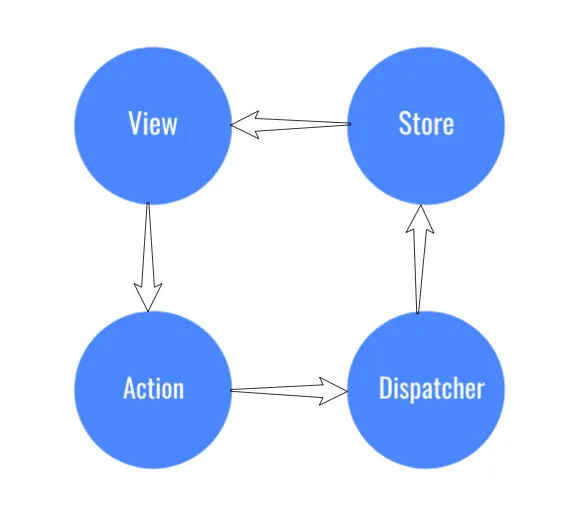
Unidirectional Data Flow
I will cover in detail in the Vuex section what each of them doing separately. Explaining the principles:
1. Single Source of Truth
Basically, every Vue application should have 2 types of data: Local and Global data.
Local data: Each component has its own local data that is accessible within that component and can be passed to other components through emitting events and props.
Global data: Application’s global data should be accessible through all components and should be kept in a single place, separated from components. This single place is the store and this conception is called SSOT (Single Source of Truth).
2. Read Only Data
Each component is capable of reading global application data from the store, but they are not able to change it. If any component intends to change data in store, they should do it through mutations and actions. This is because we do not want any component to intentionally or unintentionally change our global state.
2. Vuex
Back to Vuex. As I mentioned above, Flux is not library, it is an architecture, and Vuex is a library that implements this pattern and uses its principles. To use Vuex we can either connect it to our application via CDN link or as an npm package.
CDN link:
//It requires ES6 Promises
<script src="https://cdn.jsdelivr.net/npm/es6-promise@4/dist/es6-promise.auto.js"></script>
<script src="https://unpkg.com/vuex@3.1.0/dist/vuex.js"></script>
NPM Package:
//Run this commands to install
npm install vuex --save

//Use it like
import Vue from 'vue'
import Vuex from 'vuex'

Vue.use(Vuex)
Vuex has 4 main concepts as mentioned in Flux part: State, Getters, Mutations, and Actions.
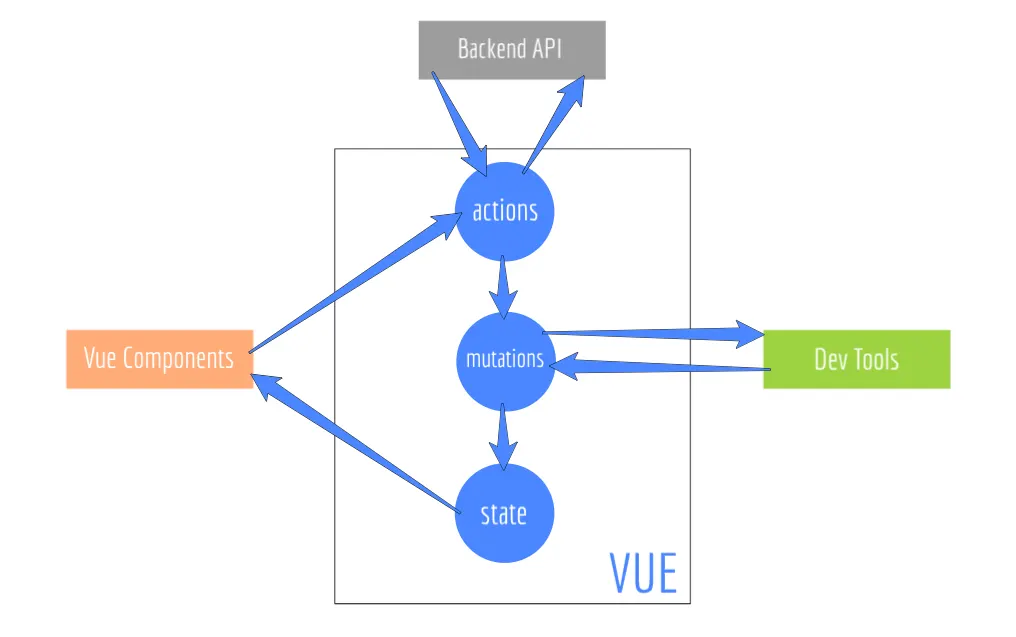
Basic setup of store:
const store = new Vuex.Store({
  state: {
    myVariable: 0
  },
  getters: {
   someFilter: state => {
    return state.myVariable[0]
   }
  },
  mutations: {
     addToArray(state, value) {
       state.myVariable.push(value)
     }
  },
  actions: {
     addToArray(context) {
      context.commit('addToArray');
     }
  }
});
Let’s look into details!
3. State
State is identical to a Vue instance data property, but data the property is local which means only accessible within that scope. State is Single Source of Truth of our application. We define and store our application data in there. Vuex’s state is also reactive, that means whenever we update any data in it, all components which uses that data, re-render accordingly.
state: {
  myVariable: []
}
4. Getters
Getters are much like computed properties in Vue instances. We grab our state data, do some filtering, and then return in Getter methods.
getters: {
  someFilter: state => {
    return state.myVariable[0]
  }
}
5. Mutations
Mutations are only a gateway to mutate our state data. We enforce our change by committing a mutation and each mutation has a name and a handler.
Mutations are synchronous
mutations: {
   addToArray(state, value) {
     state.myVariable.push(value)
   }
}

//To commit
store.commit('addToArray', 'Hey! I am added!');
6. Actions
Actions are pretty similar to the mutations but there are some differences. They are functions that commits mutations.
actions: {
   addToArray(context) {
    context.commit('addToArray');
   }
}

//Dispatching action
store.dispatch('addToArray')
Actions are dispatched, Mutations are committed.
The question is why do we have both actions and mutations while we do the same thing? There are 2 main differences between Actions and Mutations.
- Mutations are synchronous, but Actions are asynchronous.
That means we cannot request any data with axios or fetch API in mutations because mutations are synchronous. Instead we should request any data in actions along committing mutations.
- Actions are more complex, but mutations are simple.
Actions handle application functionality and logic by committing more than a mutation, requesting data etc. while mutations are individual changes that aims to do one and certain thing.
This is it for today’s article. I hope it is a good starting to get familiar with Vuex.
Known errors
- Store example initialises
myVariable: 0but later treats it as an array (push,[0]). actions.addToArraycommitsaddToArraywithout passing a value.- Vuex is superseded by Pinia as the official Vue store.