Object-Oriented JavaScript

In this article I will provide you with a basic-level overview of OOP in JavaScript. Indeed, this tutorial cannot cover the entire topic but will give you an idea of how it all works.
I will cover:
- Whats is OOP?
- Objects in JS
- Prototype Inheritance
- Modules
- Encapsulation
1. What is OOP?
OOP is a programming paradigm constructed around objects. OOP is basically used for modeling real life things (objects) into programming. It organizes chunks of code, making it reusable, and allows us to make our applications more complex without losing control over it. Individual objects can be modified without affecting other program aspects, so it is easier to update and modify programs written in object-oriented languages. JavaScript one of those languages that OOP is deeply rooted in.
OOP in JS
Although JavaScript is an object-oriented language, most people don’t use its OOP features. JavaScript has 5 primitive data types (Undefined, Null, Boolean, String, Number) which have boxed versions, objects.
var a = 1;
var b = new Number(1);
var c = a+b;
typeof(a); //returns ‘number’
typeof(b); //returns ‘object’
typeof(c); //returns ‘number’
2. Objects in JS
An object is a collection of related data and/or functionality. Let’s think of an object in real life: car. Car is an object which has properties like color, price, brand and also have functionalities such as driving, turning left or right, drifting. Let’s turn it and programmatic object.
var car = {
  color: 'black',
  price: $50.000,
  brand: 'BMW 5 series',
  drive: function() {
   //some code
  },
  turn: function(direction) {
    //some code
  },
  drift: function() {
    //some code
  },
};

car.brand; //returns 'BMW 5 series'
car.turn(right); //executes the functionality
car.color; //returns 'black'
In this example, car is an JavaScript object which has 3 properties (color, price, brand), and 3 methods (drive, turn, drift). We can access to the object properties and methods with dot notation like: objectName.property; objectName.method(arg)
We can also access properties of object with bracket notation treating them as associative arrays: objectName['property'];
JavaScript is a dynamic language, thus adding properties and methods to the objects is quite easy. Following code will add ‘year ’ property with value and ‘stop’ method to car object: car.year = ‘2018’; car.stop = function(){ //some code here};
The next thing we should know about objects is this keyword. The this keyword points to the current object (owner of it) that we write the code inside. Let’s look at an example:
var person = {
  name: 'Ilkin',
  sayHello: function() {
    alert('Hello, ' + this.name + '.');
  }
}
In this example, this.name on the 4th line, refers to person object’s name property.
We have successfully constructed our JavaScript object. As objects are not the same with classes, actually they are instance of classes, we cannot take instance of object that we created. But what if we want to create another person named Elovset? We need to reconstruct the person object each time which does not seem verbose. Instead we can create the object using constructor function, (which is known as Object Constructor) and build an instance of it as in following code:
var Person = function(name){
  this.name = name;
  this.sayHello = function() {
    alert('Hello, ' + this.name + '.');
  };
}

var elovset = new Person('Elovset');
elovset.sayHello(); //alerts 'Hello, Elovset.'

var ilkin = new Person('Ilkin');
ilkin.sayHello(); //alerts 'Hello, Ilkin.'
However this method has a drawback in memory usage. When we create an instance of Person, each instance create its own constructor function, each has different properties and methods which ruins memory.
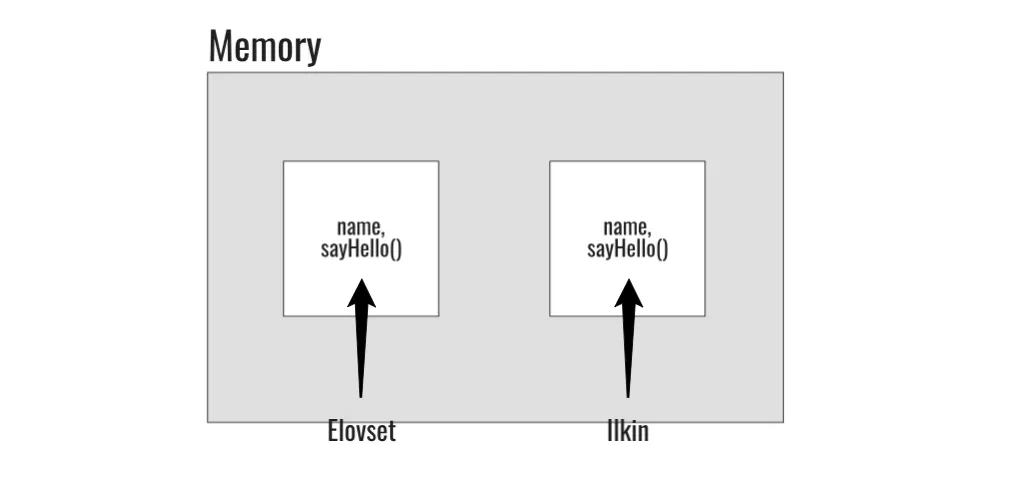
Because of this problem, we are going to learn prototypes.
3. Prototype Inheritance:
Because JavaScript doesn’t have direct class support (ES6 does with some syntactic sugar), it also doesn’t have inheritance concept. Instead we use prototype to achieve same functionality. We will see that the prototypical inheritance concept is more powerful than class-based inheritance concept. Prototypes are also an objects which means prototypes also can have prototypes defined. The advantage of using this concept is when we attach functions to the prototype, only one copy of the function exists which saves memory. We can assign functions to the prototypes as follows:
var Person = function(name){
  this.name = name;
}

Person.prototype.sayHello = function(){ console.log('Hello, ' + this.name); }

var elovset = new Person('Elovset');
elovset.sayHello(); //Hello, Elovset is written to the console
When we assign a constructor function to a prototype, the prototype becomes an object of the constructor function which is accessible (shared) among all instances of it.
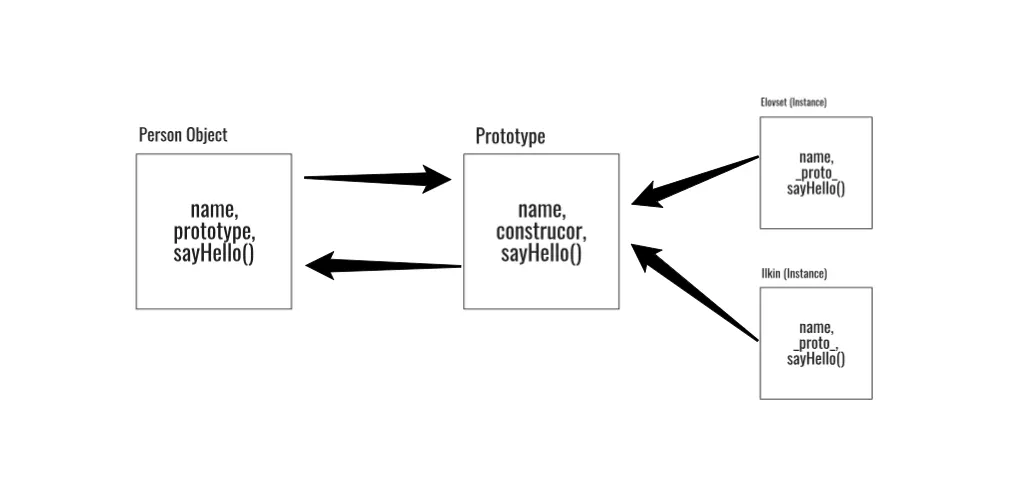
Instances don’t take place in memory because of prototype via proto property
Let’s dive more with the example:
//Creating empty constructor function
var Person = function(){
}
Person.prototype.name = 'Ilkin';
Person.prototype.nameIt = function(name){this.name = name;}

var elovset = new Person();

elovset._proto_; //Returns prototype object
elovset.name; //returns 'Ilkin'
elovset.nameIt('Elovset');
elovset.name; //returns 'Elovset'

var kichikxanim = new Person();
kichikxanim.name; //returns 'Ilkin'

//adding new properties and methods to prototype
Person.prototype.surname = 'Guluzada';
Person.prototype.sayHello= function(){alert('Hello, ' + this.name)};
elovset.surname; //returns 'Guluzada'
elovset.sayhello(); //alerts 'Hello, Elovset'
As you can see from the example code above, we can change the instance properties, but prototype properties still remains unchanged. We can also add properties and methods to the prototype and it will be accessible through all instances. Moreover, when we change a property or method in prototype, it will be updated in all instances of the constructor function.
4. Modules
Modules are distinct parts of an application which contain chunks of code and have different functionality. Think of a car again — wheels, doors, frame, gas pedal etc. are parts (modules) which come together to make whole car. Modules are widely used in all serious JavaScript applications, and there are a couple of advantages to use modules in our application: Reusability, Maintenance, and Namespacing. As with classes and inheritance, modules are not natively supported in JavaScript, but there are some ways to implement modules. The following are examples to them.
- Module Pattern
(function () {
  // All variables in closure scope are private
  var name = 'Elovset'

  var sayHello = function(){
    return 'Hello, ' + name;
  }

  console.log(sayHello());
}());

// ‘Hello, Elovset’
To distinguish variables and methods from global scope, we use anonymous closure. Everything inside of (function(){ //some code }()) belongs to the closure scope, not global. This helps to solve variable or method mixing in the global scope and lets us to organize our code structure. This method barely imitates the class conception in other languages (Java, C#, Python).
- Single Object (a.k.a Object Literal as namespace)
var myModule = {};

myModule.name = 'Ilkin';
myModule.sayHello = function(){
    return 'Hello, ' + this.name;
  };

var helloText = myModule.sayHello();
This method is basic object approach to the problem. As every property of an object is a variable itself, we can distinct global variables with the property of the objects.
It is a good practice to check if the namespace that we are trying to create exists or not by doing the following: var myModule = myModule || {};. In this code, it checks if the myModule namespace exists than we use it, if not we create one.
- CommonJS
A CommonJS module is essentially a reusable piece of JavaScript that exports certain objects and makes them available through program. If you want to dive into it, you should check this. The following code is an example on how to import and export modules:
//Inside of a JS file
function myModule() {

  this.sayHello = function() {
    return 'Hello!';
  }

  this.sayBye = function() {
    return 'Bye!';
  }
}
//We export myModule
module.exports = myModule;

//Inside of another JS file
//We import myModule
var myModule = require('myModule');

var instance = new myModule();
instance.sayHello(); //returns 'Hello!'
instance.sayGoodbye(); //returns 'Goodbye!'
5. Encapsulation
Encapsulation is a key concept in object-oriented programming. It describes the idea of bundling data and methods in a single unit. Basically we hide some of our data from outside of an object. Again, JavaScript doesn’t support private, public keywords like in other languages, but we can achieve same thing with different ways. By default, we use this keyword when we create our class properties. Using the this keyword makes our property public. If we want to make our property private, we just define the variable without this.
var Person = function(nameU, surnameU){

  //Public Property
  this.name = nameU;

  //Private Property
  var surname = surnameU;

  //Accessing Private Property
  this.getSurname = function()
    {
     return surname;
    }
}

var elovset = new Person('Elovset', 'Qelbiyuva');

elovset.name; //returns 'Elovset'
elovset.surname; //returns undefined
elovset.getSurname(); //returns 'Qelbiyuva'
There is another method for encapsulation called Revealed Module Pattern:
var Person = (function(){

    //Private members
    var surname = 'Qelbiyuva';

    return{
       //Public members
       name: 'Elovset',

        sayHello: function(){
            console.log('Hello, ' + this.name);
        }
    }
})();

person.surname; //returns undefined
person.name; //returns 'Elovset'
person.sayHello(); //returns 'Hello, Elovset'
Summary
In today’s article, we first discussed the OOP paradigm in general then in terms of JavaScript. Secondly, we look at ways to create objects and how can we build an instance of an object. Thirdly we looked at Constructor Functions and Prototyping for inheritance. After this we took a look to Modules (CommonJS), and its implementation. Finally, we talked about encapsulation and its usage. All these concepts are before ES5 and ES6. I am planning to write OOP in terms of new versions of JavaScript (ES5, ES6) in the following weeks.
Resources for learning more about OOP in Javascript:
Known errors
price: $50.000is not valid JavaScript (should be a number or string).elovset._proto_should be__proto__(orObject.getPrototypeOf).elovset.sayhello()vs the definedsayHello;instance.sayGoodbye()vs the definedsayBye.- Module-pattern example assigns to
Personbut then readsperson. car.turn(right)passes an undefined identifier.- Lists 5 primitives; modern JS has 7 (adds Symbol, BigInt).
- Typo: "Whats is OOP?".